Stem Splitting for Musicians: What It Is and How to Use It
AI-powered stem separation can isolate vocals, drums, bass, and other instruments from any recording. Here is how musicians are using it to learn songs, run better rehearsals, and level up their practice.
What Is Stem Splitting?
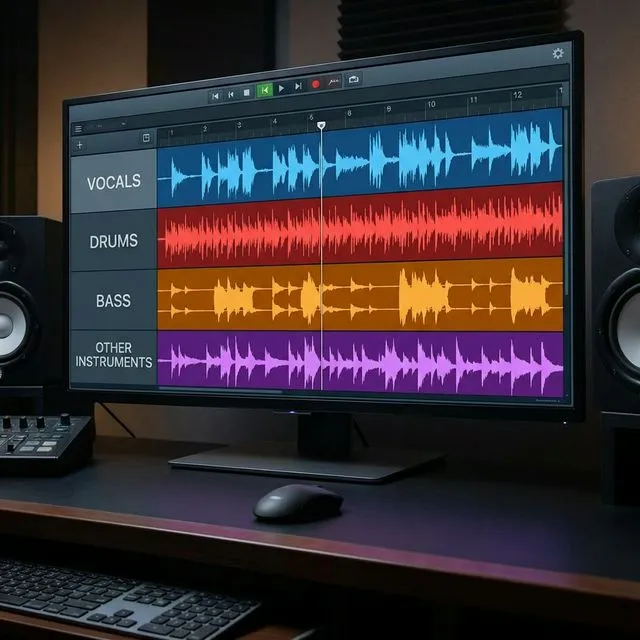
Stem splitting — also called stem separation or source separation — is the process of taking a finished audio recording and isolating its individual components. A single mixed track goes in, and you get separate files for vocals, drums, bass, and other instruments.
Until recently, this kind of separation required access to the original multi-track recording from the studio. If you did not have the master files, you were out of luck.
That changed with AI. Models like Demucs (developed by Meta) can now analyze a stereo mix and intelligently separate it into its component parts. The results are not perfect — you will hear some artifacts and bleed between stems — but they are remarkably good and getting better every year.
How Does It Work?
AI stem separation models are trained on thousands of songs where both the mixed version and the individual stems are available. The model learns patterns: what vocals sound like versus drums versus bass versus everything else.
When you feed it a new song, the model applies what it has learned to estimate each component. The most common split is four stems:
- Vocals — lead and backing vocals
- Drums — kick, snare, hi-hat, cymbals, and percussion
- Bass — bass guitar, synth bass, and low-frequency instruments
- Other — guitars, keyboards, synths, horns, and everything else
Some advanced models offer six-stem separation, pulling out piano or guitar as distinct stems.
Why Musicians Should Care
Learn Parts by Ear More Easily
Trying to pick out a bass line buried under a wall of guitars? Solo the bass stem. Want to hear exactly what the vocalist is doing in the bridge? Mute everything else. Stem separation gives you X-ray vision into any recording.
Practice Along Without Your Part
Drummers can mute the drum stem and play along with the rest of the band. Guitarists can remove the guitar and fill in the gap themselves. This is like having a backing track for any song ever recorded.
Transcribe More Accurately
When you can hear an isolated part clearly, transcription becomes dramatically easier. No more rewinding the same two seconds fifty times trying to figure out what chord is hiding under the drums.
Run Better Rehearsals
Upload a reference track, split the stems, and use them during rehearsal to fill in for a missing member. If your keyboard player cannot make it, you can still hear the keys while the rest of the band plays live.
Create Custom Backing Tracks
Playing a stripped-down acoustic set? Use stems to build a backing track with just drums and bass. Doing a duo gig? Keep the drums and keyboards, play guitar and sing live.
How to Split Stems in Gig Friend
Gig Friend integrates AI stem separation directly into your song library. Here is how it works:
- Upload any song to your library
- Open the song and tap the stem separation button
- The AI processes the track (usually takes a minute or two)
- Your four stems appear as individual waveforms you can solo, mute, or adjust
No need to download separate software, convert file formats, or manage files manually. The stems live right alongside your song notes, section markers, and setlist assignments.
Tips for Getting the Best Results
Start with high-quality source files. The better the input audio, the cleaner the separation. A 320kbps MP3 or WAV file will give better results than a 128kbps stream rip.
Expect some bleed. No stem separation is 100 percent clean. You may hear ghost artifacts of other instruments in a stem. This is normal and usually does not interfere with practice or rehearsal use.
Use it as a tool, not a crutch. Stem separation is incredible for learning, but do not skip the work of training your ear. Use the isolated stem to verify what you hear, not to replace active listening.
The Bottom Line
Stem splitting is one of the most useful tools to become available to musicians in years. Whether you are learning a new song, building a custom backing track, or running a rehearsal with a missing member, the ability to pull any recording apart into its component pieces changes how you prepare and perform.
Gig-Friend Team
The Gig-Friend team is dedicated to helping gig economy workers take control of their finances, optimize their workflow, and build sustainable freelance careers.
Related articles

5 Ways AI Is Changing How Musicians Practice
From stem separation to automatic transcription, AI tools are transforming how musicians learn songs and prepare for performances. Here are the five biggest shifts.

What Are Music Stems & How Do Bands Use Them?
A beginner-friendly guide to music stems, how AI has made them accessible to every musician, and the practical ways bands use stems to learn songs, run better rehearsals, and prepare for gigs.

Isolating Instruments: A Guide to Music Splitter Apps
A comprehensive comparison of music splitter apps for musicians. Learn how AI source separation works, compare the top tools, and find the right one for your practice and performance workflow.