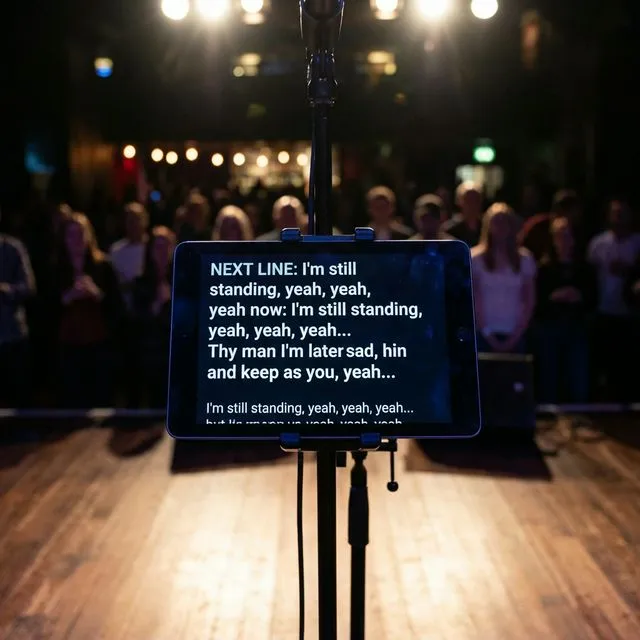
How to Use the Stage Teleprompter in Gig Friend
Forget lyric sheets and music stands. Learn how to use Gig Friend's built-in teleprompter to display lyrics on stage so you can focus on performing.
The Problem with Lyric Sheets
Every gigging vocalist knows the struggle. You have a binder full of printed lyrics. The pages are in the wrong order. The font is too small to read under stage lighting. A breeze from the venue door scatters your carefully organized stack across the stage floor.
Or maybe you use your phone. Squinting at a tiny screen between verses, trying to scroll with sweaty fingers, hoping the screen does not auto-lock mid-song.
There has to be a better way — and there is.
What Is the Stage Teleprompter?
Gig Friend includes a built-in teleprompter mode that displays lyrics on screen during performance. Think of it like the teleprompters used by news anchors or keynote speakers, but designed specifically for musicians on stage.
The teleprompter shows your lyrics in a large, high-contrast format that is easy to read under any lighting conditions. You can set it to auto-scroll at a pace that matches the song, or manually advance through sections.
Setting Up Your Lyrics
Before you can use the teleprompter, your songs need lyrics. There are two ways to get them into Gig Friend:
AI Lyrics Extraction
Gig Friend can automatically extract lyrics from any uploaded recording using AI speech recognition. The extracted lyrics include timing information, so the teleprompter knows when each line should appear.
To use this:
- Open a song in your library
- Tap the lyrics extraction button
- Wait for the AI to process the track (usually under a minute)
- Review and edit the extracted text for accuracy
Manual Entry
You can also type or paste lyrics manually. This gives you full control over formatting and is useful when the AI extraction needs significant corrections or when you want to add performance notes alongside the lyrics.
Using the Teleprompter on Stage
Auto-Scroll Mode
In auto-scroll mode, the lyrics scroll continuously at a speed you set. This works well for songs with a steady tempo and predictable pacing. Adjust the scroll speed during sound check so it matches your performance tempo.
Section-Based Mode
If your songs have section markers (which they should — this is one of Gig Friend’s core features), the teleprompter can advance section by section. This gives you more control and handles songs with variable pacing, instrumental breaks, or ad-lib sections.
Display Settings
Customize the teleprompter for your stage setup:
- Font size — large enough to read from several feet away
- Color scheme — high-contrast options for bright or dark stages
- Orientation — landscape for tablets, portrait for phones
Tips for Performing with a Teleprompter
Use It as a Safety Net, Not a Crutch
The goal is to know your lyrics well enough that you only glance at the screen occasionally. The teleprompter is there for the moments when your mind goes blank — not as a substitute for learning the words.
Position Your Device at Eye Level
Mount your tablet on a mic stand adapter or place it on a music stand. Looking down at a device on the floor breaks your connection with the audience. Eye level keeps you looking forward.
Practice with It Before the Gig
Do at least one full run-through with the teleprompter before using it live. Make sure the scroll speed is right, the font is readable, and you are comfortable glancing at it without losing your place in the song.
Keep It Simple
Do not overload the teleprompter with chord symbols, arrangement notes, and lyrics all at once. The teleprompter is for lyrics. Keep other reference material in the song’s notes section, which you review before the song starts.
The Result
A teleprompter does not make you a better singer, but it does remove one of the biggest sources of on-stage anxiety: forgetting the words. With that worry gone, you can focus on what actually matters — connecting with the audience and delivering a great performance.
Gig-Friend Team
The Gig-Friend team is dedicated to helping gig economy workers take control of their finances, optimize their workflow, and build sustainable freelance careers.
Related articles

Synchronized Lyrics: The Best Way to Learn Vocals
Finding lyrics online is easy. Learning them well enough to perform confidently is the hard part. Discover how synchronized, time-synced lyrics change the way vocalists learn and how to use them on stage.

How a Setlist Helper App Can Save Your Next Gig
A good setlist helper app does more than list songs in order. It stores your repertoire, shares with your band, displays on stage, and keeps everyone on the same page. Here's what to look for and why it matters.

The Ultimate Guide to Setlist Creation for Live Shows
Everything you need to know about setlist creation for live performances. Energy flow, key transitions, tempo pacing, multi-set planning, and the tools that make it easier.